Billing & Quotas
Billing
View your current plan, manage payment methods, and adjust team seats.
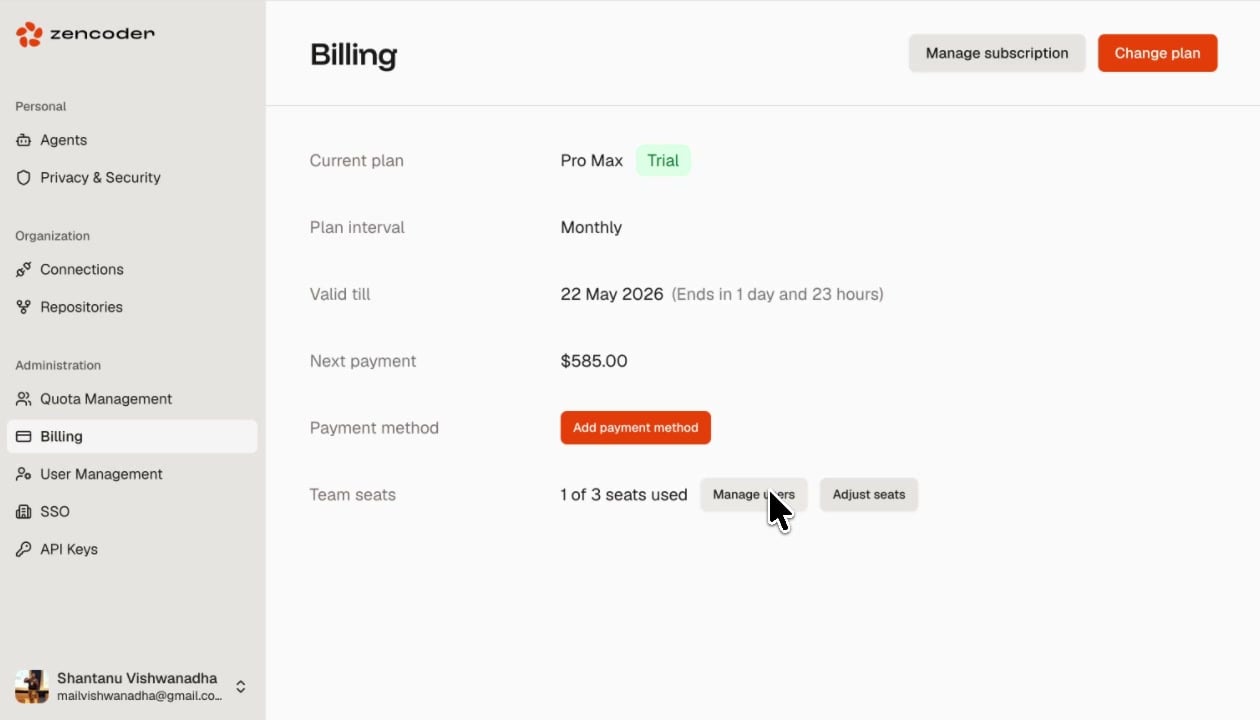
The Billing page shows your organization’s subscription details and provides controls for managing payments and team size.
Was this page helpful?
Documentation Index
Fetch the complete documentation index at: /llms.txt
Use this file to discover all available pages before exploring further.
New: Multi-Model Orchestration — assign different AI models to planning, coding, and review phases. Learn more →
View your current plan, manage payment methods, and adjust team seats.
| Field | Description |
|---|---|
| Current plan | Your active plan name and trial status (if applicable) |
| Plan interval | Monthly or Annual billing cycle |
| Valid till | Subscription expiration date with countdown |
| Next payment | Amount due at the next billing cycle |
| Payment method | Card on file or Add payment method to set one up |
| Team seats | Number of seats used out of total available |
| Action | Description |
|---|---|
| Manage subscription | View invoice history and modify subscription settings |
| Change plan | Upgrade or downgrade your plan |
| Add payment method | Add a credit card or other payment method |
| Manage users | Jump to User Management to add or remove team members |
| Adjust seats | Increase or decrease the number of available seats in your plan |
Was this page helpful?