> ## Documentation Index
> Fetch the complete documentation index at: https://docs.zencoder.ai/llms.txt
> Use this file to discover all available pages before exploring further.
# Models
> Choose which LLM powers your chat, understand cost multipliers, and optionally bring your own API key
## Overview
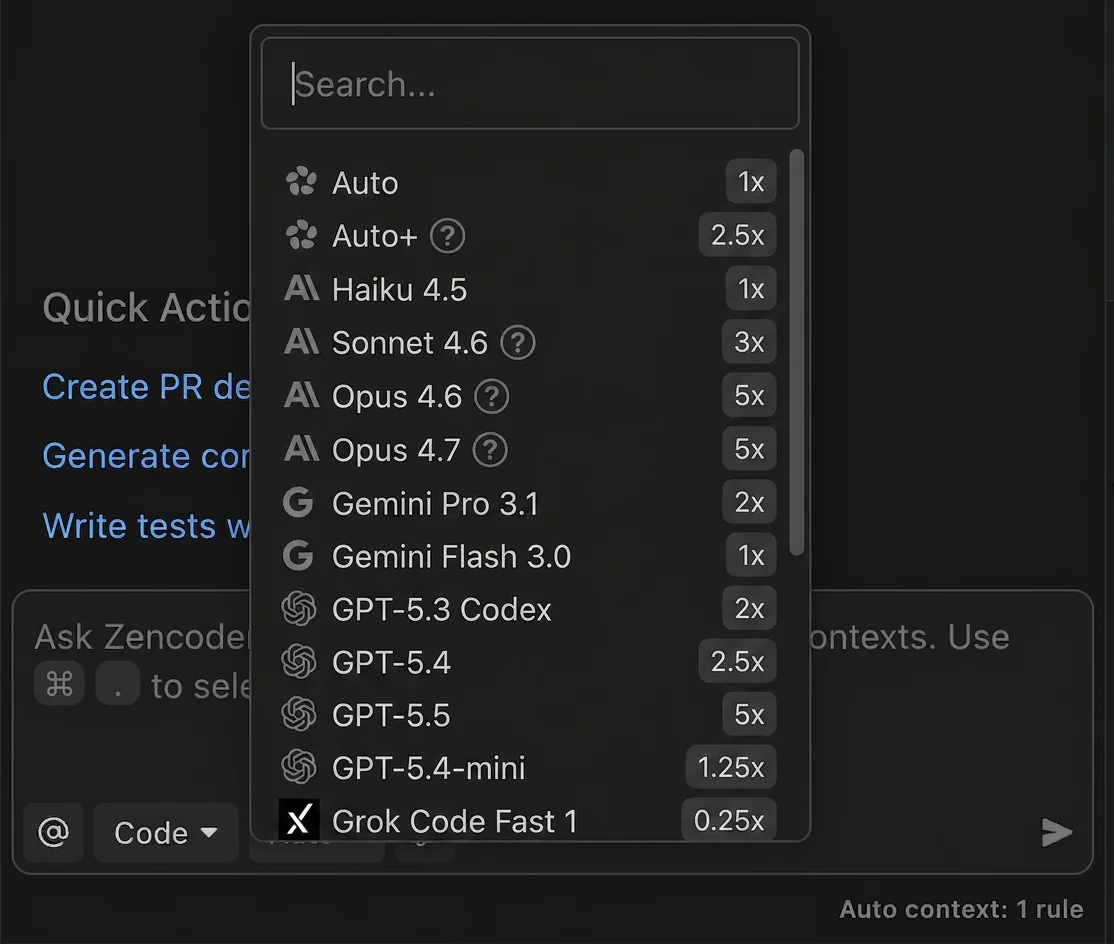
Zencoder has a model selector in the chat input. Use the dropdown to pick which LLM runs your messages. The options you see depend on your plan and entitlements.
* Model choices may differ by plan; higher plans unlock additional models
* Select the model that fits your task from the selector
Zencoder supports models from OpenAI, Anthropic, Google, and xAI.
## Available models (subject to change)
The Auto model routes across a tuned mix of self-hosted and vendor models for the best balance of speed, quality, and cost.
 | Model | Provider | Multiplier | Plan Requirements |
| :--------------- | :-------- | ---------: | :--------------------- |
| Auto | Zencoder | 1× | All plans |
| Auto+ | Zencoder | 2.5× | All plans |
| Haiku 4.5 | Anthropic | 1× | Pro, Pro Plus, Pro Max |
| Sonnet 4.6 | Anthropic | 3× | Pro, Pro Plus, Pro Max |
| Opus 4.6 | Anthropic | 5× | Pro Plus, Pro Max |
| Opus 4.7 | Anthropic | 5× | Pro Plus, Pro Max |
| Gemini Pro 3.1 | Google | 2× | All plans |
| Gemini Flash 3.0 | Google | 1× | All plans |
| GPT-5.3 Codex | OpenAI | 2× | Pro, Pro Plus, Pro Max |
| GPT-5.4 | OpenAI | 2.5× | Pro, Pro Plus, Pro Max |
| GPT-5.5 | OpenAI | 5× | Pro Plus, Pro Max |
| GPT-5.4-mini | OpenAI | 1.25× | Pro, Pro Plus, Pro Max |
| Grok Code Fast 1 | xAI | 0.25× | All plans |
Lowest multipliers: Grok Code Fast 1 (0.25×), Auto (1×). All multipliers and model availability are subject to change.
Model availability evolves over time. We may add, remove, or upgrade models without notice as providers change capabilities and pricing. Your selector will always reflect the currently supported set for your plan.
## Cost multipliers and credits
Zencoder measures usage in credits. Some models use a multiplier to reflect provider costs or parallel reasoning. See the table above and the screenshot for current multipliers.
Example: If a response would normally consume 10 credits, running it with Opus 4.7 (5×) would count as 50 credits. For details about credit consumption and accounting, see the [Credit Usage Reference](/faq/pricing#credit-usage-reference) table in Pricing & Plans.
## Plan-based availability
Not all plans have access to all models. The selector shows what your current plan can use. If you recently upgraded but don’t see expected options, restart your IDE to refresh entitlements.
* **Pro, Pro Plus, and Pro Max plans**: Full model selector with all available models
* **Free plan**: Access to Auto, Gemini Flash 3.0, and Grok Code Fast 1
## Bring Your Own Key (BYOK)
You can use your own API key for certain providers. This is useful if you:
* Want to bypass credit consumption for those requests
* Prefer billing directly with the provider
Supported providers in the UI today: Anthropic and OpenAI.
BYOK is currently available on all plans, including Free, Pro, Pro Plus, Pro Max, and Enterprise.
### Enable BYOK
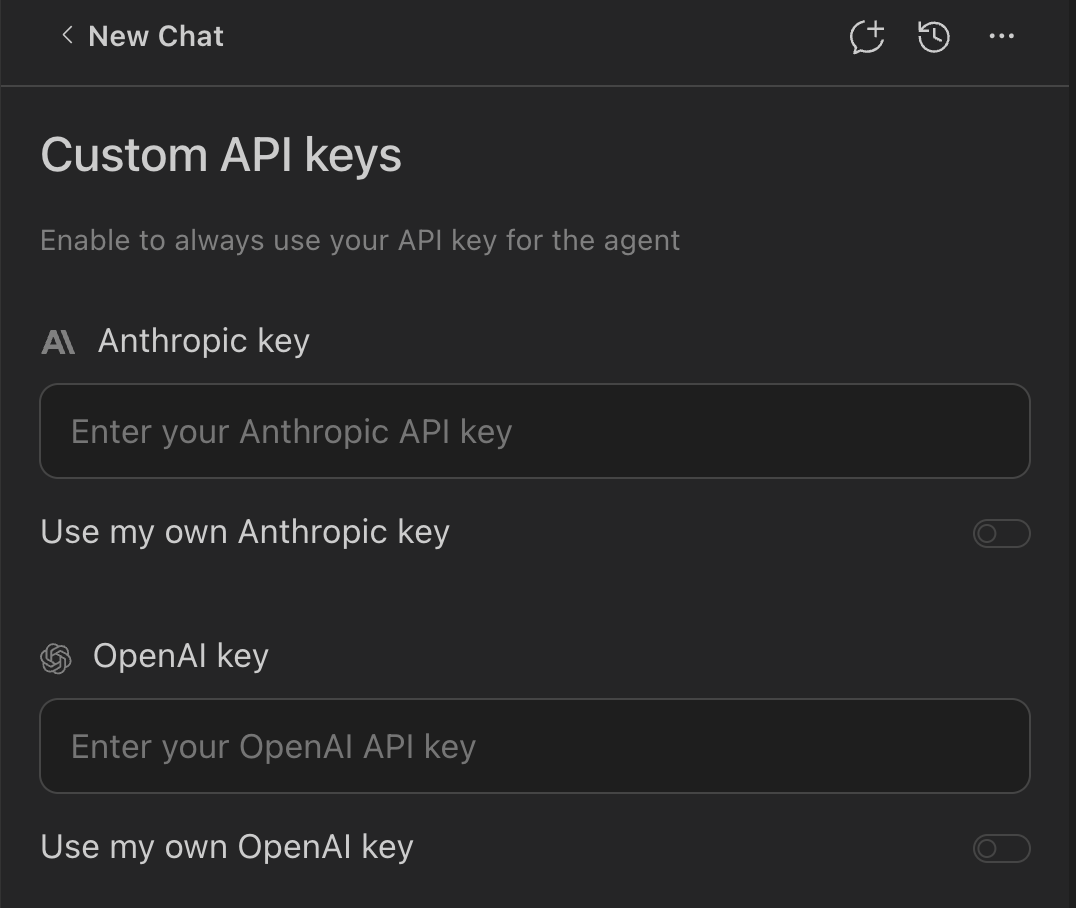
Click the Zencoder icon in your IDE, then click the ⋯ (three dots) menu.
Select
| Model | Provider | Multiplier | Plan Requirements |
| :--------------- | :-------- | ---------: | :--------------------- |
| Auto | Zencoder | 1× | All plans |
| Auto+ | Zencoder | 2.5× | All plans |
| Haiku 4.5 | Anthropic | 1× | Pro, Pro Plus, Pro Max |
| Sonnet 4.6 | Anthropic | 3× | Pro, Pro Plus, Pro Max |
| Opus 4.6 | Anthropic | 5× | Pro Plus, Pro Max |
| Opus 4.7 | Anthropic | 5× | Pro Plus, Pro Max |
| Gemini Pro 3.1 | Google | 2× | All plans |
| Gemini Flash 3.0 | Google | 1× | All plans |
| GPT-5.3 Codex | OpenAI | 2× | Pro, Pro Plus, Pro Max |
| GPT-5.4 | OpenAI | 2.5× | Pro, Pro Plus, Pro Max |
| GPT-5.5 | OpenAI | 5× | Pro Plus, Pro Max |
| GPT-5.4-mini | OpenAI | 1.25× | Pro, Pro Plus, Pro Max |
| Grok Code Fast 1 | xAI | 0.25× | All plans |
Lowest multipliers: Grok Code Fast 1 (0.25×), Auto (1×). All multipliers and model availability are subject to change.
Model availability evolves over time. We may add, remove, or upgrade models without notice as providers change capabilities and pricing. Your selector will always reflect the currently supported set for your plan.
## Cost multipliers and credits
Zencoder measures usage in credits. Some models use a multiplier to reflect provider costs or parallel reasoning. See the table above and the screenshot for current multipliers.
Example: If a response would normally consume 10 credits, running it with Opus 4.7 (5×) would count as 50 credits. For details about credit consumption and accounting, see the [Credit Usage Reference](/faq/pricing#credit-usage-reference) table in Pricing & Plans.
## Plan-based availability
Not all plans have access to all models. The selector shows what your current plan can use. If you recently upgraded but don’t see expected options, restart your IDE to refresh entitlements.
* **Pro, Pro Plus, and Pro Max plans**: Full model selector with all available models
* **Free plan**: Access to Auto, Gemini Flash 3.0, and Grok Code Fast 1
## Bring Your Own Key (BYOK)
You can use your own API key for certain providers. This is useful if you:
* Want to bypass credit consumption for those requests
* Prefer billing directly with the provider
Supported providers in the UI today: Anthropic and OpenAI.
BYOK is currently available on all plans, including Free, Pro, Pro Plus, Pro Max, and Enterprise.
### Enable BYOK
Click the Zencoder icon in your IDE, then click the ⋯ (three dots) menu.
Select User API key from the dropdown to open Custom API keys.
Paste your Anthropic or OpenAI key, save, then pick a matching provider model in the model selector.
 When BYOK is active for a given provider/model, those requests do not consume Zencoder credits — usage and billing are governed by your provider account. Make sure you understand the provider's pricing before enabling heavy workloads.
Keep your keys secure. Only paste keys into the official Zencoder UI. If you rotate/regenerate keys at the provider, update them in Zencoder as well.
## Model provider data handling
Data handling varies by provider, model, feature, region, account configuration, and access method. Some providers or models may retain prompts, code inputs, files, context, outputs, or related request data for limited periods to operate their services, prevent abuse, maintain security, or meet legal requirements. Review the applicable provider documentation before using a model for sensitive workloads.
When you use a model through Zencoder credits, plan entitlements, or Zencoder-managed model access, Zencoder sends relevant request data to the applicable model provider to provide the feature. When you use your own API key, token, or provider account, including BYOK, the provider's terms with you govern the provider's processing, usage, billing, and data handling.
The links below point to provider documentation describing data handling, abuse monitoring, retention controls, or related privacy/security practices for model access. Provider practices may vary by model, feature, region, account configuration, access method, and provider terms.
| Provider | Relevant provider data handling documentation |
| --------- | ---------------------------------------------------------------------------------------------------------------------------------------------------------------------------------------------------------------------------- |
| Anthropic | [Anthropic API and data retention](https://platform.claude.com/docs/en/manage-claude/api-and-data-retention) |
| OpenAI | [OpenAI data controls in the API platform](https://developers.openai.com/api/docs/guides/your-data) |
| Google | [Gemini API abuse monitoring](https://ai.google.dev/gemini-api/docs/usage-policies); [Google Cloud Gemini zero data retention](https://docs.cloud.google.com/gemini-enterprise-agent-platform/resources/zero-data-retention) |
| xAI | [xAI API Security FAQ](https://docs.x.ai/developers/faq/security) |
## When to switch models
* Use the Auto model for most coding tasks - it balances speed, quality, and cost
* Use the Auto+ for superior performance on complex tasks (2.5× multiplier)
* Use Haiku 4.5 for a fast and cost-efficient option (1× multiplier)
* Use Grok Code Fast 1 when you need the most cost-efficient option (0.25× multiplier)
* Use GPT-5.4-mini for cost-efficient code generation (1.25× multiplier)
* Use Gemini Pro 3.1 for high-quality performance with balanced capability (2× multiplier)
* Use Sonnet 4.6 for spec-driven development tasks requiring persistent state tracking and parallel execution
* Use GPT-5.5 for specialized code generation tasks (Pro Plus and Pro Max plans, 5× multiplier)
* Use Opus 4.6 for challenging tasks requiring high capability (Pro Plus and Pro Max plans, 5× multiplier)
* Use Opus 4.7 (Pro Plus and Pro Max plans) for the most complex reasoning tasks, keeping the 5× multiplier in mind
Heavier reasoning models may produce better results on difficult tasks but at higher credit consumption. Keep separate chats for different experiments to maintain clarity.
## Troubleshooting
Make sure you’re on the new plans. Sign out/in to refresh entitlements.
Restart your IDE after signing back in.
Confirm you selected a model that matches the provider whose key you added, and that the key is valid/active.
## Related
Learn how credits and usage-based billing work
See how models are applied in the full agentic workflow
When BYOK is active for a given provider/model, those requests do not consume Zencoder credits — usage and billing are governed by your provider account. Make sure you understand the provider's pricing before enabling heavy workloads.
Keep your keys secure. Only paste keys into the official Zencoder UI. If you rotate/regenerate keys at the provider, update them in Zencoder as well.
## Model provider data handling
Data handling varies by provider, model, feature, region, account configuration, and access method. Some providers or models may retain prompts, code inputs, files, context, outputs, or related request data for limited periods to operate their services, prevent abuse, maintain security, or meet legal requirements. Review the applicable provider documentation before using a model for sensitive workloads.
When you use a model through Zencoder credits, plan entitlements, or Zencoder-managed model access, Zencoder sends relevant request data to the applicable model provider to provide the feature. When you use your own API key, token, or provider account, including BYOK, the provider's terms with you govern the provider's processing, usage, billing, and data handling.
The links below point to provider documentation describing data handling, abuse monitoring, retention controls, or related privacy/security practices for model access. Provider practices may vary by model, feature, region, account configuration, access method, and provider terms.
| Provider | Relevant provider data handling documentation |
| --------- | ---------------------------------------------------------------------------------------------------------------------------------------------------------------------------------------------------------------------------- |
| Anthropic | [Anthropic API and data retention](https://platform.claude.com/docs/en/manage-claude/api-and-data-retention) |
| OpenAI | [OpenAI data controls in the API platform](https://developers.openai.com/api/docs/guides/your-data) |
| Google | [Gemini API abuse monitoring](https://ai.google.dev/gemini-api/docs/usage-policies); [Google Cloud Gemini zero data retention](https://docs.cloud.google.com/gemini-enterprise-agent-platform/resources/zero-data-retention) |
| xAI | [xAI API Security FAQ](https://docs.x.ai/developers/faq/security) |
## When to switch models
* Use the Auto model for most coding tasks - it balances speed, quality, and cost
* Use the Auto+ for superior performance on complex tasks (2.5× multiplier)
* Use Haiku 4.5 for a fast and cost-efficient option (1× multiplier)
* Use Grok Code Fast 1 when you need the most cost-efficient option (0.25× multiplier)
* Use GPT-5.4-mini for cost-efficient code generation (1.25× multiplier)
* Use Gemini Pro 3.1 for high-quality performance with balanced capability (2× multiplier)
* Use Sonnet 4.6 for spec-driven development tasks requiring persistent state tracking and parallel execution
* Use GPT-5.5 for specialized code generation tasks (Pro Plus and Pro Max plans, 5× multiplier)
* Use Opus 4.6 for challenging tasks requiring high capability (Pro Plus and Pro Max plans, 5× multiplier)
* Use Opus 4.7 (Pro Plus and Pro Max plans) for the most complex reasoning tasks, keeping the 5× multiplier in mind
Heavier reasoning models may produce better results on difficult tasks but at higher credit consumption. Keep separate chats for different experiments to maintain clarity.
## Troubleshooting
Make sure you’re on the new plans. Sign out/in to refresh entitlements.
Restart your IDE after signing back in.
Confirm you selected a model that matches the provider whose key you added, and that the key is valid/active.
## Related
Learn how credits and usage-based billing work
See how models are applied in the full agentic workflow